
A Visit Challenge Offer is a marketing strategy where you can incentivize customers to visit your stores by providing rewards, discounts, or exclusive deals after a certain number of visits. This approach encourages repeat business and strengthens customer loyalty.
Key Elements of a Visit Challenge Offer
-
Objective: Motivate customers to visit multiple times within a specified period.
-
Tracking: This is handled by your Spendgo Loyalty Program.
-
Incentives: Provide a tangible reward after meeting the visit goal.
-
Time Frame: Set a clear time limit to create urgency.
-
Accessibility: Ensure the offer is easy to understand and engage with.
Visit Challenge Offer Examples
-
Visit 2+ times this week and earn 45 Bonus Points
Target low frequency customers and incentivize them to visit more this week. -
Visit 3+ times and Spend $25+ to get $5 Off this
Run a month-long challenge encouraging customers to visit more frequently and ensure they aren’t simply purchasing bottle of water each time.
Things To Know
-
You will typically schedule your email and SMS communication at the beginning of the campaign window and the Visit Challenge Offer at the end.
-
Ex. You want to give out 45 Bonus Points for visiting 2+ times in a week, so you’ll schedule your email and SMS campaigns to go out on 1/1 and the Offer to be deposited on 1/7.
-
This Tutorial will only show you how to create the Offer campaign.
-
-
In your Audience segment, it is possible to define additional rules such as being exclusive to registered members only, only SMS subscribers get the offer, etc.
Create A Visit Challenge Offer
-
Navigate to Campaigns / Create.
-
Select the Date & Time automation type and click Next.
-
Select the Offer action.
-
Enter your offer details.
-
Note: Offers do not apply retroactively and are only applicable to future purchase. Only the “Add points” offer will instantly be credited to Member’s accounts.
-
ex. electing the “Multiply Points” offer type will mean future purchase earn bonus points instead of the qualifying purchases. Our suggestion is not to use this offer type for Visit Challenges
-
-
-
Click Next.
-
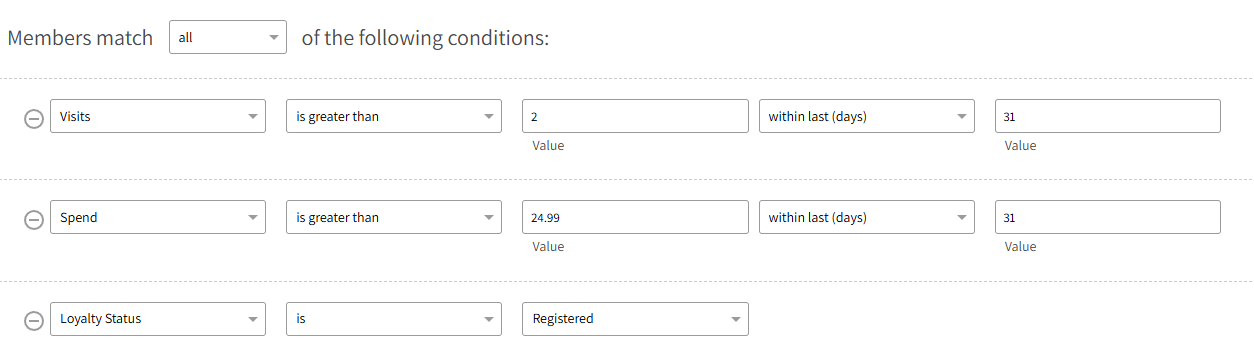
Select an existing or define your new audience. Below are some audience examples:
-
2 or more more visits in the last 7 days

-
Registered Members with 3 or more visits and $25 more more spend in the last 31 days
-
-
Schedule your offer campaign to run at the end of the Visit Challenge window.
-
This is an important step, otherwise the wrong Members will earn the offer.
-