
Duplicating a campaign is a quick way to reuse the setup of an existing campaign without starting from scratch. This action creates a new campaign draft with all settings prefilled, allowing you to make updates where needed before scheduling. It’s especially useful when running recurring promotions or testing variations of a successful campaign.
Things to Know
-
You must have an Admin or Marketing Manager user role to manage all of your brand’s campaigns.
-
Franchisee Users with Marketing permissions can only edit the campaigns they created.
Duplicating a campaign allows you to quickly reuse an existing campaign’s settings for a new campaign.
-
In the Spendgo Dashboard, navigate to Campaigns / Manage.
-
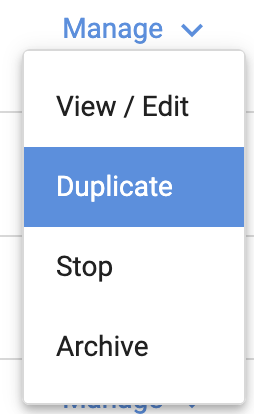
On the far right of the campaign row you wish to manage, click Manage / Duplicate.
-
You will enter the Campaign Builder flow with the campaign settings prefilled.
This flow is the similar to Create a New Campaign. -
Review all settings carefully:
-
Some fields depend on other settings, and changes may trigger additional fields to require review.
-
Make sure every setting is correct before scheduling.
-
-
Schedule your campaign for launch.
Related Articles
-
Create a New Campaign
Learn how to build a new campaign from scratch. -
View/Edit a Campaign
Manage campaign details and adjust settings where allowed. -
Stop a Campaign
End a live campaign immediately. -
Archive a Campaign
Remove a campaign from your active view once it’s no longer needed.